A practical guide for teams: Git workflow, app design, integrations, security, CI/CD and delivery
Oracle Visual Builder Studio (VBS) brings a low-code application builder together with Git repositories, CI/CD pipelines and agile project tools in one place. That combination lets a small team go from idea to a running application very quickly. It also makes it easy to build up problems quickly: tangled pages, painful merge conflicts, hard-coded endpoints and deployments that only one person understands.
This guide collects the practices that make the biggest difference for teams working in VBS. Each section explains what to do, why it matters and what to avoid, with diagrams and tables you can share in team discussions or reviews.
What this guide covers
| Section | Description |
|---|---|
| 1. The building blocks | What each part of VBS does and who owns it |
| 2. Project setup | How to structure repositories and agree on naming |
| 3. Git workflow | Branching, merge requests, reviews and conflict handling |
| 4. Application design | Flows, pages, fragments, action chains, variables and types |
| 5. Service connections | Reusable, efficient and safe REST integrations |
| 6. Security | Roles, secrets, backend enforcement and validation |
| 7. Environments and CI/CD | Dev, test and production, plus pipeline stages |
| 8. Testing and performance | What to test, how often, and how to keep pages fast |
| 9. Agile and documentation | Issues, definition of done, README contents |
| 10. Common mistakes | Problems teams hit most often and how to fix them |
| 11. Adoption plan and checklist | A 30-day rollout plan and a team checklist |
1. Understand the building blocks
VBS is really several tools sharing one workspace. Knowing which part handles what makes every later decision easier, and helps you assign ownership on the team.
| Area | What it does | Your main responsibility |
|---|---|---|
| Visual Builder | Design web and mobile apps with pages, flows, fragments, variables, action chains and service connections | Keep the app modular, readable and reusable |
| Git repositories | Store application source and record every change | Branch, review and merge safely |
| Pipelines | Build, test and deploy automatically | Make releases repeatable and low-risk |
| Environments | Targets such as development, test and production | Keep settings separate and promotions controlled |
| Issues and boards | Plan sprints and track tasks and bugs | Link every change to a reason |
Key idea
Low-code does not mean low-discipline. Speed comes from the visual tools. Reliability comes from the habits around them: version control, review, automation and clear structure.
2. Set up the project for the long term
A few decisions made before anyone builds a page will save the team a great deal of friction later.
Organize projects and repositories
- One VBS project per product or team. The project holds repositories, issues, pipelines and environments, so keep related work together instead of creating a new project for each small app.
- Give each repository one purpose. If you build an application and keep documentation, test scripts or shared configuration, place them in clearly named folders or separate repositories.
- Set access deliberately. Decide who can merge to the main branch, who can approve merge requests and who can trigger production deployments.
- Keep a short project charter. Two paragraphs describing the app’s purpose, users and owners help new members orient themselves quickly.
Agree on naming conventions early
Consistent names make an application readable to someone who did not build it. That person is often you, six months later.
| Item | Pattern | Examples |
|---|---|---|
| Flows | Business area, lowercase | orders, customers, admin |
| Pages | Subject and purpose | order-list, order-detail, customer-edit |
| Fragments | What it displays | customer-summary, page-header |
| Action chains | Verb and outcome | loadOrders, saveCustomer, showErrorMessage |
| Variables | Noun, camelCase | selectedOrder, filterStatus |
| Service connections | System or API name | crm-service, inventory-service |
| Branches | Type and topic | feature/order-search, fix/date-format |
| Issues | Short outcome statement | Users can filter orders by status |
3. Make Git the backbone of your workflow
Visual Builder stores pages and flows as JSON and metadata files. When two people edit the same page on long-lived branches, merges become slow and error-prone. The remedy is simple: small branches, frequent merges and clear ownership.
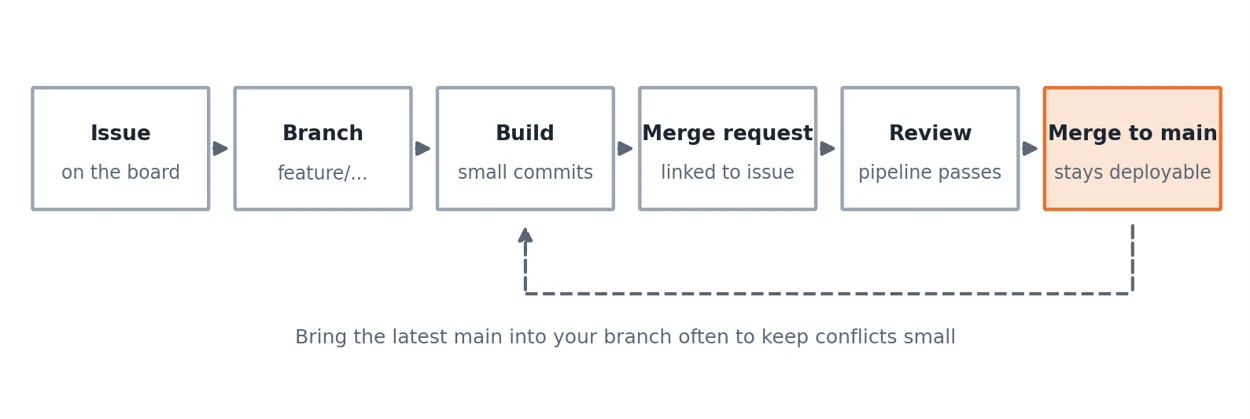
Figure 1. One task, one branch, one reviewed merge request.
Branching rules
- Never build directly on main. Keep it stable and deployable at all times.
- One branch per task. A branch should map to one issue, whether a feature, a bug fix or a small refactor.
- Keep branches short-lived. Aim to merge within a few days. A branch open for weeks is a merge conflict waiting to happen.
- Bring main into your branch often. Do it at least once a day when others are merging, so conflicts stay small.
- Assign work by area. Divide tasks by flow, page or fragment so two people are rarely editing the same file.
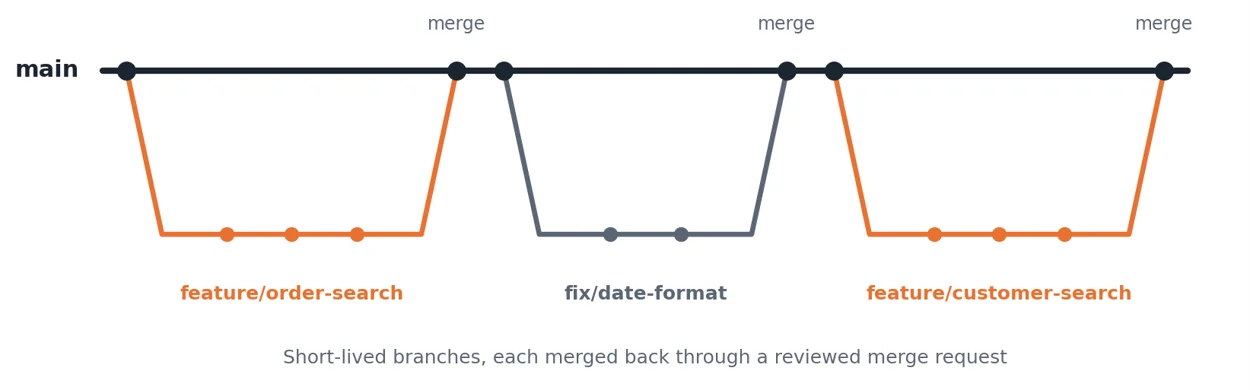
Figure 2. Short-lived branches merged back through reviewed merge requests.
Write useful commit messages
Commit history is the story of your application. A good message says what changed and why, in one line, and links to the issue when possible.
| Weak | Better |
|---|---|
| update page | Add status filter to order list (issue 142) |
| fixes | Fix date format on invoice page for non-US locales |
| wip | Extract customer summary into shared fragment |
Run merge requests as real reviews
Require at least one reviewer for every merge request. The reviewer should check more than whether the app runs.
| Review area | Questions to ask |
|---|---|
| Readability | Are names clear? Are action chains short and focused? Could a new team member follow the logic? |
| Reuse | Is anything duplicated that should be a fragment, module or shared chain? |
| Data access | Does the page request only the fields and rows it needs? Is paging or filtering done on the server? |
| Security | Are secrets absent from the code? Is access enforced on the backend as well as in the UI? |
| Error handling | What does the user see when a service call fails? |
| Traceability | Is the merge request linked to an issue with a clear description? |
Handle conflicts calmly
- Bring the latest main into your branch before you start resolving anything.
- Resolve conflicts one file at a time and keep both sides’ intent, not just one side’s text.
- Open the app after resolving and click through the affected pages, because JSON that merges cleanly can still break bindings.
- Ask the other author if you are unsure what their change was meant to do.
4. Design applications for reuse and clarity
Visual Builder makes it easy to build quickly and just as easy to build a mess. A little discipline early keeps the application maintainable as it grows.
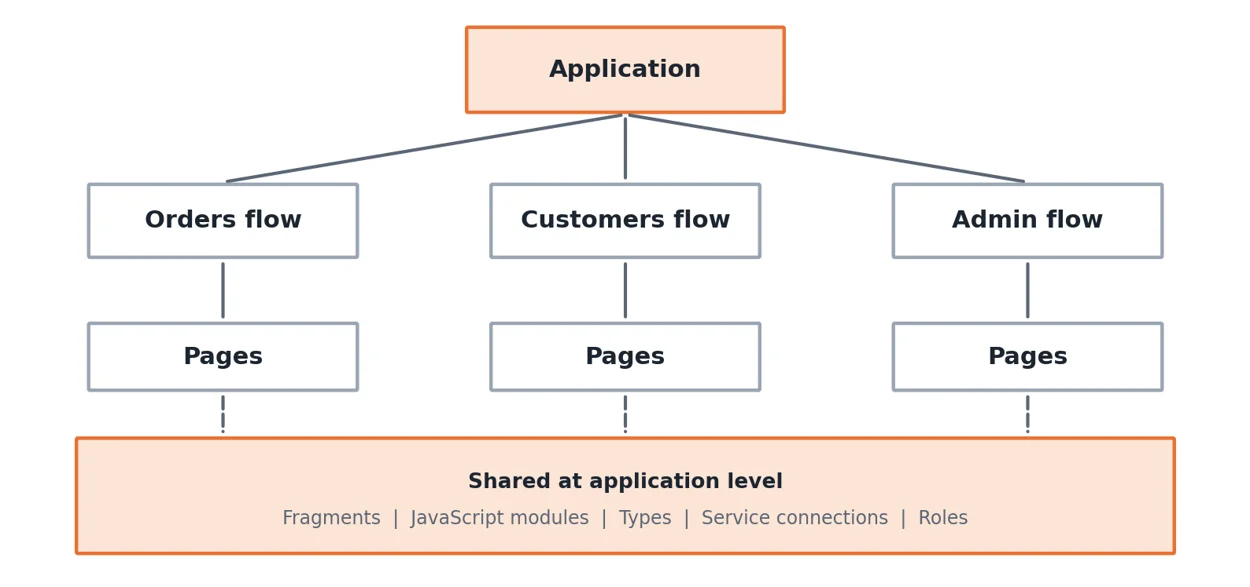
Figure 3. Flows group business areas. Anything used in more than one place moves to the shared layer.
Use flows, pages and fragments deliberately
- Flows represent business areas, such as orders, customers and administration. Each flow has its own pages and can hold its own variables.
- Pages should stay focused on one task. If a page tries to do several things, split it.
- Fragments hold repeated UI, such as a customer summary card, a page header or a common filter bar. If you copy the same components onto a second page, that is the sign to create a fragment.
Keep action chains small and clear
- Give each chain one job and a name that describes the outcome, for example loadOrders or saveCustomer.
- Break long chains into smaller ones that call each other. A chain with dozens of steps is hard to read, debug and review.
- Handle the failure path in every chain that calls a service. Show a clear message and stop cleanly.
- Use comments or descriptive labels on steps whose purpose is not obvious.
Centralize shared logic
Put validation rules, formatting helpers and common calculations in application-level JavaScript modules or shared chains instead of repeating them on each page. When a rule changes, you change it once.
Scope variables carefully
| Scope | Use it for | Watch out for |
|---|---|---|
| Page | Values only one page needs, such as a selected row or form field | This is the default. Start here. |
| Flow | Data shared by pages in the same business area | Reset values when the user leaves the flow |
| Application | Truly global data, such as the signed-in user or theme | Too many become hidden global state that is hard to trace |
Define types for your data
Define types for records and service responses so components, variables and service calls agree on shape. It prevents subtle binding errors and makes pages easier to understand.
Design for clarity in the interface
- Use plain words that users recognize, and keep action names consistent across the app, such as always using Save and Cancel.
- Show loading and empty states. A blank area looks like a bug.
- Keep pages light. Move rarely used content to separate pages or load it on demand.
5. Manage service connections properly
Most real applications sit on top of REST services, whether Oracle Fusion applications, ORDS, or custom APIs. How you connect to them affects security, speed and how easily you can move between environments.
| Do | Avoid |
|---|---|
| Define each connection once and reuse it across pages | Hard-coding endpoints inside individual calls |
| Configure endpoints and credentials per environment | Editing URLs by hand before each release |
| Request only the fields you need | Fetching whole records when a page shows three columns |
| Filter, sort and paginate on the server | Loading thousands of rows to filter in the browser |
| Show a clear message and log details when a call fails | Leaving the user with a blank screen |
| Agree with service owners on versions and changes | Discovering breaking changes in production |
Common slowdown
Pulling large collections into the browser and filtering there is one of the most common causes of slow applications. Push filtering, sorting and paging to the service, and measure with realistic data volumes.
6. Build security in from day one
Security added at the end is expensive and incomplete. Treat it as part of the design of every page and every integration.
| Practice | Why it matters | Avoid |
|---|---|---|
| Enforce permissions on the backend service | Hidden UI can be bypassed. Server checks cannot. | Treating hidden buttons as security |
| Restrict flows and pages with roles | Users see only what they should | Giving everyone access to every page |
| Use credential and secret features | Keeps secrets out of source control | Committing passwords, tokens or API keys |
| Validate input on client and server | Client checks help users, server checks protect data | Trusting client-side validation alone |
| Review who can deploy to production | Limits accidental or unauthorized changes | Open access to production pipelines |
Also review access regularly. People change teams, and permissions granted for a project often outlive the need for them.
7. Automate delivery with environments and pipelines
The DevOps side of VBS is where teams gain the most reliability. Manual deployments depend on one person’s memory. Pipelines turn the process into something anyone can run and everyone can trust.
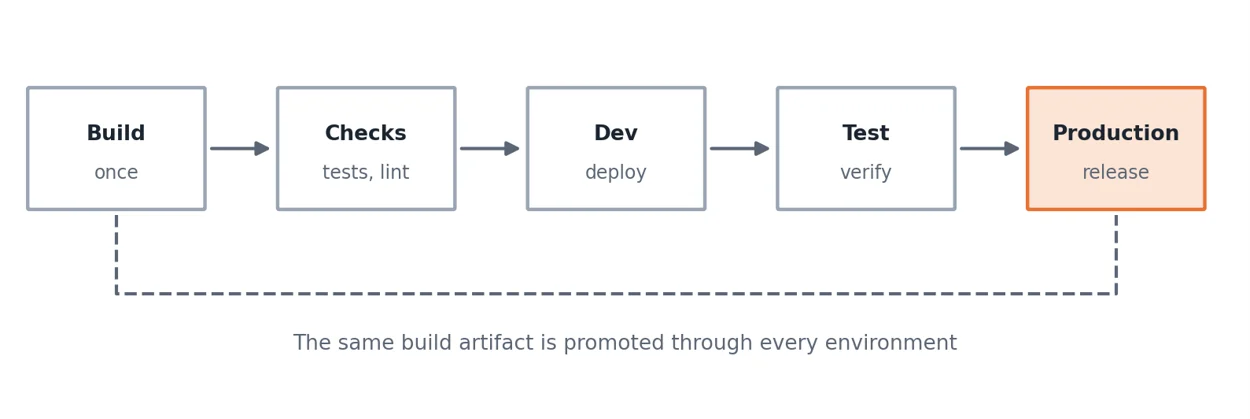
Figure 4. Build once, run checks, then promote the same artifact through each environment.
Use separate environments
| Environment | Purpose | Typical users |
|---|---|---|
| Development | Try changes quickly and break things safely | Developers |
| Test | Verify features and regressions with realistic data | Testers, reviewers, product owners |
| Production | Serve real users | End users |
Design the pipeline in stages
| Stage | What happens | Fails the run when |
|---|---|---|
| Build | Package the application once | The build cannot complete |
| Checks | Run automated tests and code quality checks | Any required check fails |
| Deploy to dev | Publish to the development environment | Deployment errors occur |
| Deploy to test | Publish the same artifact for verification | Smoke tests fail |
| Deploy to production | Release with approval | Approval is withheld or a health check fails |
Release practices that reduce risk
- Promote the same artifact. Build once and promote that artifact so what you tested is exactly what you release.
- Gate merges on pipeline results. A broken main slows the whole team, so require a passing build before merging.
- Require approval for production. A quick sign-off from a second person catches many mistakes.
- Keep a rollback plan. Know how to return to the previous version before you need to.
- Release small and often. Small releases are easier to test and easier to undo.
- Keep deployment repeatable. Anyone on the team should be able to trigger it and get the same result.
8. Test and watch performance
| Type | What to check | When |
|---|---|---|
| Manual walkthrough | Key user journeys from start to finish, including error cases | Before every release |
| Automated UI or API tests | The most important paths, run repeatedly with the same result | In the pipeline on every change |
| Cross-browser and device checks | Layout and behavior on supported browsers and screen sizes | Before release and after major UI changes |
| Performance checks | Page load, service response times and behavior with realistic data volumes | Regularly, and whenever data grows |
| Access checks | That each role sees only the pages and data intended | When roles or pages change |
Performance habits
- Watch the browser console and network tab while developing. Errors, failed calls and slow requests show up there first.
- Use pagination and lazy loading for large lists.
- Avoid calling the same service several times on one page when one call would do.
- Test with production-sized data, not just a handful of sample records.
- Remove unused pages, variables and connections regularly. Dead code confuses newcomers and hides real problems.
9. Track work and document as you go
Use issues and boards
Every task and bug should exist as an issue, linked to its branch and merge request. That gives you a history of what changed and why and lets the team see progress on the board without status meetings.
A useful issue contains
- A short outcome statement, such as: Users can filter orders by status.
- Acceptance criteria that can be checked.
- Any linked designs, service details or dependencies.
Agree on a definition of done
| A task is done when… |
|---|
| The change is merged through a reviewed merge request linked to its issue |
| The pipeline has passed, including automated checks |
| It has been verified in the test environment |
| Any new service connection, role or setting is documented |
| The README or release notes reflect the change |
Keep a README for every application
| Section | Contents |
|---|---|
| Purpose | What the app does and who uses it |
| Structure | Main flows, shared fragments and modules |
| Connections | Services used and who owns them |
| Environments | What differs between development, test and production |
| Deployment | How to release and how to roll back |
| Contacts | Who to ask about the app, its services and its data |
Ten minutes of writing saves hours of onboarding.
10. Common mistakes and how to fix them
| Mistake | Effect | Fix |
|---|---|---|
| Building directly on main | Unreviewed changes and broken releases | Branch per task and require merge requests |
| Long-lived branches | Large, painful merges | Merge within days and sync often |
| Copying components between pages | Fixes must be repeated everywhere | Create fragments and shared modules |
| Very long action chains | Hard to debug or review | Split into small, named chains |
| Too many application-level variables | Hidden state and unexpected behavior | Use the narrowest scope that works |
| Hard-coded endpoints and credentials | Risky releases and leaked secrets | Configure per environment and use secret features |
| Filtering in the browser | Slow pages with large data | Filter and paginate on the server |
| Rebuilding for each environment | Untested code reaches production | Promote one artifact through all environments |
| Skipping documentation | Knowledge lives in one person’s head | Keep a README and definition of done |
Final thoughts
The theme running through all of this is that fast tools reward steady habits. Visual Builder Studio speeds up development, but version control discipline, modular design, secure and efficient integrations and automated delivery decide whether a project stays healthy as it grows. Start with a few practices, make them routine and add more as the team gains confidence. Done well, your team can move quickly without breaking things.

Ujjwal Thakkar is an Oracle Technical professional specializing in Oracle Visual Builder (VB/VBCS), Visual Builder Studio (VBS), Oracle Integration Cloud (OIC), and Oracle Fusion Cloud Applications. He is passionate about exploring Oracle Cloud technologies, solving technical challenges, and sharing practical implementation knowledge with the Oracle community.
Stay Ahead with ERP & AI Insights
Actionable insights on ERP, AI and business solutions, straight to your inbox each month.
Subscribe for InsightsFollow Orbrick on Google
Pick Orbrick as a preferred source and Google is more likely to show you our insights in Top Stories and AI Mode.
Recent Posts





Categories
Latest News

Website Launch And 3 Lessons From Chandrayan-3
January 16, 2024


Real Time Visibility In Supply Chain
January 16, 2024