In the previous part of “Processing Large Data in Oracle ERP System” we discussed code optimization techniques and how they play a crucial role in reports that contain large amounts of data, which is tough to process in ERP systems. We discussed various techniques, like query optimization or query restructuring, or processing it outside of the system, to achieve the expected results.
We discussed how to handle large datasets in Oracle Fusion ERP that lead to slow reports, failed integrations, and performance bottlenecks due to system limits. We also discussed performance improvements; it can be improved in two ways:
- Code Optimization (proper joins, removing subqueries, using views, query tuning)
- Data Size Reduction (filters, chunking, bursting)
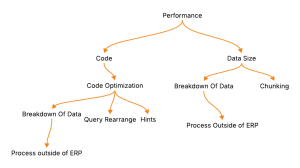
When Fusion’s transactional system struggles, offloading heavy processing to data warehouses (OAC/BICC) or third-party tools (Power BI, APEX) can significantly improve performance. By applying these techniques, organizations can generate faster reports, avoid timeouts, and maintain smooth business operations as data volumes grow.
While these discussed techniques are helpful to refine the logic and efficiency of queries, performance issues persist if data size is large. As we know, it is hard to process millions of rows of data in cloud-based ERP systems. Even fine-tuned queries also struggled while processing millions of rows.
Understanding Large Data Set Challenges
When working with ERP systems like Oracle Fusion, especially reports where data is large, like GL Transactional Balance or Supplier Aging Report. These types of reports, once executed in the blink of an eye, can lead to failure because of the data size.
Unlike traditional databases, Fusion ERP operates on a cloud-based transactional model, where
- We cannot access the database directly to create indexes or partitions for performance tuning.
- Resource limits (like BI Publisher data row limits or API payload sizes) are enforced by Oracle.
- System performance depends heavily on how efficiently data is filtered before execution.
Hence, the idea is not to pull all data at once and process it, but to request and fetch only that data which is necessary.
Key Strategies For Data Size Optimization
- Filtering at Source
One of the most effective ways to reduce data size is to filter data at the source level using query parameters in the report. It is recommended to apply filters in the query to reduce data size.
For example, as we know, aging reports or trial balance reports generate a huge amount of data. To reduce the data, we can use parameters like from and to date in non-aging reports, and for aging reports, we can restrict data based on suppliers or business units.
This ensures that the query fetches relevant rows instead of scanning the entire dataset.
2. Chunking
One of the features available in Fusion is chunking, allowing data to be processed in smaller and manageable portions. Chunking divides the large output into smaller parts and prevents timeout.
- Steps to enable chunking in BI Publisher
- First, we need to enable chunking at the instance level.
For this: Administrator -> Manage Publisher -> Runtime Configuration -> Set Enable Data Chunking to True. This will enable the chunking option in the data model
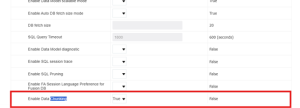
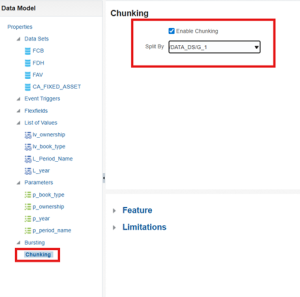
2. After enabling it in the runtime configuration, go to the data model, and now we can see the chunking option there. Here, select the data model under “split by” to enable chunking on that data set.
3. After enabling chunking of the data model, the final step is to enable it at the report level. To enable it at the report level, edit the report and under properties, enable chunking and provide the chunking size (Between 100 MB and 300 MB)
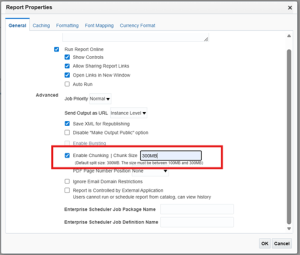
4. This will enable the chunking, and the report output will be divided into size of 300 MB.
3. Bursting Reports
Bursting allows reports to be split in parts based on recipients or data categories. For example, One large report divided into parts based on supplier, Business Unit.
- Advantages
- Speed up report deliveries
- Provides data segregation for better compliance and access control
- Reduce the runtime by executing it in parallel
4. Incremental Reporting
Instead of processing the entire dataset every time, use incremental extraction to fetch only new or changed records since the last run.
- Maintain a “last run date” parameter
- Use logic like WHERE last_update_date > :p_last_run_date
- Combine incremental data with previously stored results in a downstream system (data warehouse, BI tool, etc.)
This drastically reduces report size and execution time while keeping data current.
Conclusion
Handling large datasets in Oracle Fusion ERP requires a balance between code optimization and data size management.
- Part 1 focused on writing efficient queries, using views, and optimizing joins.
- Part 2 explored how to manage the volume itself through filtering, chunking, bursting, and incremental processing.
Together, these strategies form a complete framework for high-performance reporting and integration in Oracle Fusion ERP.
By adopting these practices, organizations can ensure scalability, maintain stability, and deliver data faster even as their systems continue to grow.

Pranat Damani is a Senior Technical Consultant with 7 years of experience specializing in SCM and Finance. With expertise in Data Migration, OIC, and reports, he excels in delivering innovative solutions. Beyond work, he is passionate about playing football and enjoys reading.
Recent Posts

 Design Office