Opening Preface
Many consultants think you need OCI Data Science or complex API integrations to do this. You do not. Oracle EPM Planning has a native engine that can read PMML (Predictive Model Markup Language) files directly. It embeds your custom Python logic within the EPM calculation engine, making Oracle EPM BYOM (Bring Your Own Model) a practical and accessible capability.
The gap between a Data Scientist’s Python notebook and a Planner’s web form is where most Machine Learning projects go to die. We have the data. We have the technology. What we are missing is the bridge. This isn’t just a technical tutorial; it’s a blueprint for turning Oracle EPM from a passive reporting tool into an active, predictive powerhouse within modern Oracle EPM deployment options.
Phase 1: The Architecture (How it actually works)
- Extraction: You export 4-5 years of historical data (Salary, Headcount, Attrition) from EPM or HCM as part of your broader Oracle EPM cloud setup.
- Training (The “Data Science” Part): You use Python (Pandas/Scikit-Learn) or R on your local machine to train a model (e.g., Linear Regression, Random Forecast, or Neural Network), independent of core Oracle EPM infrastructure.
- The Bridge: You export that trained model as a .pmml file (using the sklearn2pmml library).
- Ingestion: You upload the .pmml file to EPM Cloud (under IPM > ML Models) to enable the Oracle EPM BYOM workflow.
- Execution: EPM automatically generates a Groovy Rule based on your model. When a user runs this rule, EPM passes the current form data to the PMML engine and writes the prediction back to the cell, contributing to overall Oracle EPM performance optimization.

Phase 2: The Step-by-Step Implementation
Step 1: The Python Work (Local Machine)
Scenario: Predicting “Employee Attrition Risk” based on “Salary” and “Tenure.”
The Code Snippet (Python):
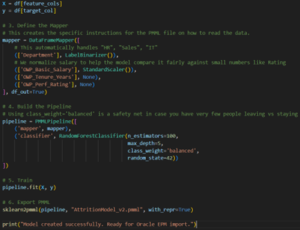
Step 2: Import into Oracle EPM
Navigation: Go to IPM -> ML Models.
- Action: Click Import and drag your Attrition_Model_v1.pmml file here as part of the Bring Your Own Machine Oracle EPM process.
- This is the critical technical part. EPM will ask you to map the PMML “Inputs” to EPM Dimensions
- PMML Input OWP_Basic Salary -> EPM Member OWP_Salary.
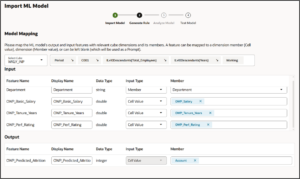
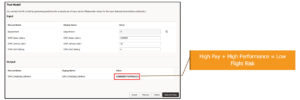
Test the model:
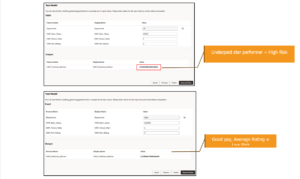
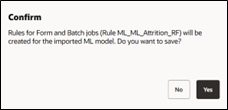
- The Confirmation message is displayed. Two Groovy rules are generated for each ML model definition.
- No complex Groovy coding required. The system wraps the ML model in a Groovy wrapper automatically.
- At the confirmation message, click Yes.
You can review the generated rules in Calculation Manager. The Groovy rules define the name and location of the PMML file, along with input and output based on the mapping you defined.
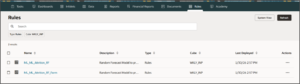
Step 4: The User Experience
- Attach this rule to an Action Menu on a Web Form.
- The Test: Enter a low salary for an employee. Right-click -> Run Prediction.
- The Result: The “Predicted Attrition” cell automatically updates to number in percentage format (or a probability score) based on your custom Python logic, further supporting Oracle EPM performance optimization.
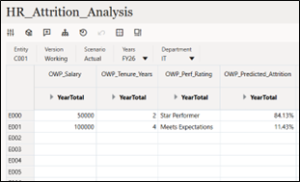
Phase 3: The “CFO Value” (Why do this instead of Auto Predict?)
- Transparency vs. Black Box:
- Generic Way: Oracle’s Auto Predict uses standard time-series algorithms. You don’t know why it predicted what it predicted.
- Our Way (BYOML): You know exactly which variables (Inflation, Market Competitiveness, Commute Time) are driving the prediction because you built the model using Oracle EPM BYOM.
- Specific vs. Generic:
- Every company is different. An ARIMA, SARIMA model might work for Retail sales but fail for IT Attrition. BYOML allows you to choose the exact algorithm (Random Forest, Decision Tree) that fits your specific data pattern within flexible Oracle EPM deployment options.
- IP Protection:
- You are bringing your organization’s intellectual property (your proprietary data models) and embedding them into the financial planning tool, strengthening control across Oracle EPM infrastructure.
Summary: Your Data, Your Rules
Every company is unique. So why would you trust a generic algorithm to predict your specific future?
This architecture proves that you don’t need to choose between “easy” and “accurate”. You can build a model that fits your specific data pattern – whether it’s for attrition, sales, or manufacturing and embed it directly where decisions are made using Bring Your Own Machine Oracle EPM capabilities.
You have the historical data. You have the platform. Now, you have the logic to turn “What happened?” into “What’s next?” within a scalable Oracle EPM cloud setup.
Turn your EPM application from a passive reporting tool into an active predictive powerhouse. Don’t just plan for the future – define it.

Shubham Panchal is a skilled EPM Fusion professional with 4.5 years of hands-on experience in enterprise performance management solutions. Beyond the world of spreadsheets and financial planning, you’ll find him on the cricket field, channeling the same focus and teamwork into his favorite sport.
Stay Ahead with ERP & AI Insights
Actionable insights on ERP, AI and business solutions, straight to your inbox each month.
Subscribe for InsightsRecent Posts





Categories
Latest News

Website Launch And 3 Lessons From Chandrayan-3
January 16, 2024


Real Time Visibility In Supply Chain
January 16, 2024