Introduction
Oracle BI Publisher (BIP) is the enterprise reporting engine at the heart of Oracle Fusion’s reporting and analytics platform. It handles everything from creating, formatting, and distributing highly formatted reports such as invoices, purchase orders, payroll slips, and financial statements. Since reports often surface sensitive business data like headcount, financials, PII; Security is not an optional layer you add at the end, it is a first-class design concern from the very start of every BIP implementation.
Oracle BIP security operates at two distinct levels that work together:
- Data Level: What data can a user see inside a report that they are allowed to run?
- Folder Level: Which reports and data models can a user even see, open, or run?
For example, Folder Level Security may allow multiple managers to access the same sales report stored in a shared folder. However, without Data Level Security, all managers might see all company sales data, including regions or business units they should not access. By applying Data Level Security, each manager only sees their assigned region or department data, even though they run the same report.
Together, these layers ensure proper governance, confidentiality of sensitive information, and compliance with enterprise security policies within BI Publisher reporting.
A. Data Level Security in Oracle BI Publisher
Data-level controls are a core component of Oracle BI Publisher security. It governs the rows and values returned by a report’s data model. Even if two users run the same report, they should see only the data they are authorized to see. In Oracle Fusion BIP there are two practical approaches to achieving this.
A1. Based on the Logged-In User
Oracle Fusion applications expose a set of Secured List Views (SLVs) that are pre-wired to the Fusion security framework. When a BIP data model queries an SLV instead of a raw base table, the view automatically filters its output based on the identity of the currently logged-in user and the data access grants assigned to that user’s roles.
Consider an HCM example. The base table for person records is PER_ALL_PEOPLE_F. If you write:
INSECURE: returns all person records to everyone
SELECT person_id, person_number FROM PER_ALL_PEOPLE_F
WHERE TRUNC(SYSDATE) BETWEEN effective_start_date AND effective_end_date
Any user who can run the report will see every person in the organization. Replace the base table with its secured counterpart:
SECURE: returns only the persons the logged-in user has access to
SELECT person_id, person_number
FROM PER_PERSON_SECURED_LIST_V
WHERE TRUNC(SYSDATE) BETWEEN effective_start_date AND effective_end_date
The SLV PER_PERSON_SECURED_LIST_V enforces the HCM data roles assigned to the user, meaning an HR specialist scoped to one business unit sees only that unit’s employees.
| Table Name | Secured List View | Roles Having Privilege |
|---|---|---|
| PER_ALL_PEOPLE_F | PER_PERSON_SECURED_LIST_V | Documents of Record Transaction Analysis duty role Payroll Transaction Analysis duty role Workforce Transaction Analysis duty role |
| PER_PERSONS | PER_PUB_PERS_SECURED_LIST_V | Documents of Record Transaction Analysis duty role Payroll Transaction Analysis duty role Workforce Transaction Analysis duty role |
| PER_ALL_ASSIGNMENTS_M | PER_ASSIGNMENT_SECURED_LIST_V | Human Resource Analyst job role |
| HR_ALL_ORGANIZATION_UNITS_F | PER_DEPARTMENT_SECURED_LIST_V | Absence Management Transaction analysis duty role Payroll Transaction Analysis duty role Vacancy Transaction Analysis duty role Workforce Transaction Analysis duty role |
| HR_ALL_ORGANIZATION_UNITS_F | PER_LEGAL_EMP_SECURED_LIST_V | Payroll Transaction Analysis duty role |
| HR_ALL_POSITIONS_F | PER_POSITION_SECURED_LIST_V | Absence Management Transaction analysis duty role Payroll Transaction Analysis duty role Vacancy Transaction Analysis duty role Workforce Transaction Analysis duty role |
| PER_LEGISLATIVE_DATA_GROUPS | PER_LDG_SECURED_LIST_V | Payroll Transaction Analysis duty role |
| PAY_ALL_PAYROLLS_F | PER_PAYROLL_SECURED_LIST_V | Payroll Transaction Analysis duty role |
| CMP_SALARY | CMP_SALARY_SECURED_LIST_V | Compensation Transaction Analysis duty role |
| PER_JOBS_F | PER_JOB_SECURED_LIST_V | Absence Management Transaction analysis duty role Payroll Transaction Analysis duty role Vacancy Transaction Analysis duty role Workforce Transaction Analysis duty role |
| PER_LOCATIONS | PER_LOCATION_SECURED_LIST_V | Absence Management Transaction analysis duty role Payroll Transaction Analysis duty role Vacancy Transaction Analysis duty role Workforce Transaction Analysis duty role |
| PER_GRADES_F | PER_GRADE_SECURED_LIST_V | Absence Management Transaction analysis duty role Payroll Transaction Analysis duty role Vacancy Transaction Analysis duty role Workforce Transaction Analysis duty role |
etc.
All these privileges are available through the “Workforce Confidential Reporting” duty role, which is inherited by the Human Resource Analyst job role.
For financial modules like Payables and Receivables, data security requires an additional step: initializing the multi-org session before the main query executes. This is done in the data model’s Before Data trigger using MO_GLOBAL.INIT, as shown below:
Initialise the Payables session context for the logged-in user
DECLARE
TYPE refcursor IS REF CURSOR;
xdo_cursor refcursor;
BEGIN
MO_GLOBAL.INIT('AP_MANAGE_PAYABLES_INVOICE_DATA');
OPEN :xdo_cursor FOR
SELECT SYSDATE run_date FROM DUAL;
>END;
AP_MANAGE_PAYABLES_INVOICE_DATA is the Fusion privilege that grants access to Payables business units. The corresponding privilege for Receivables is AR_VIEW_RECEIVABLES_ACTIVITIES_DATA. Without this initialization call, a report against AP or AR secured tables may return no data or return all data regardless of the user’s actual business unit access, both outcomes are incorrect.
Benefits of MOAC Security:
- Dynamic Row-Level Security: Data access restrictions are enforced transparently through database synonyms.
Centralized Security Management: Data visibility is governed through user roles and privileges defined in the Fusion security framework.- Consistent Reporting Security: Reports that reference MOAC-enabled synonyms automatically inherit the underlying data access controls, supporting compliance.
- No Changes Required to Core Tables: Developers interact with synonyms rather than base tables, reducing the risk of security gaps while simplifying development.
A2. Specific Data Set: Hardcoding Roles or Using Session Variables
There are scenarios where you cannot or do not want to rely on the automatic SLV filter. You may need to restrict data to a specific set of users at query time, for example showing a manager only their own direct reports or limiting a report to the user who submitted a specific request. Oracle BIP provides session variables that are available inside the data model query at runtime.
The key session variables:
| Session Variable | What It Returns |
|---|---|
| :xdo_user_name | The username of the currently logged-in user |
| FND_GLOBAL.USER_NAME | Same as above, via the FND global package |
| fnd_global.user_guid | The user’s GUID in the identity store |
| HRC_SESSION_UTIL.get_user_personid | The Person ID of the logged-in user (HCM-specific) |
| fnd_profile.value(‘PER_BUSINESS_GROUP_ID’) | The user’s assigned business group |
| USERENV(‘LANG’) | The session language |
An example of hardcoding a session variable into a query to restrict a self-service report:
SELECT CONTACT_TYPE ,CONTACT_PERSON_ID
FROM per_contact_relationships
WHERE person_id = (
SELECT user_id
FROM PER_USERS
WHERE username = FND_GLOBAL.USER_NAME )
This technique is appropriate when the filtering logic is intentional, deliberate, and part of the report’s design specification. However, hardcoding should be done consciously, not as a substitute for proper secured views.
B. Folder Level Security in Oracle Fusion BI Publisher
Folder level security is a foundational aspect of Oracle BI Publisher security. It governs visibility and access to the objects in the BIP catalog: Reports, Data models, sub-templates, and dashboards. This is configured in the BI Catalog and operates entirely independently of the data level. A user must pass both layers to successfully run a report.
For a user to run a report, their role must have Read permission on every catalog object referenced by the report, at minimum the report itself and the data model. If the report references a sub-template or style template, read permission must be granted on those objects too.
There are two approaches to managing folder-level security in Oracle BI Publisher.
B1. Permission-Based Access (Direct Object Permissions)
The simplest approach is to grant permissions directly on a folder or report to a specific user. In the BIP catalog, navigate to the object, click More → Permissions, and assign one of the following permission levels to a user or role:
- Read
- Traverse
- Write
- Delete
- Change Permissions
- Set Ownership
- Run Publisher Report
- Schedule Publisher Report
- View Publisher Output
- Full Control – all of the above
Below are the Two checkboxes we get while giving the Permission to Folder
- Apply permissions to sub-folders
- Apply permissions to items within folder
On selecting those, permissions granted at the folder level are inherited by all objects within that folder. This means you can set permissions once on a parent folder, and all child reports and data models automatically inherit those permissions.
This approach is practical for one-off access grants or small teams. It becomes hard to manage at scale, because you end up tracking individual user names against dozens of catalog objects with no central governance.
B2. Role-Based Access (Abstract/Dummy Role Pattern)
The recommended and scalable pattern for folder-level security is the Abstract/Dummy Role approach. Here is how it works:
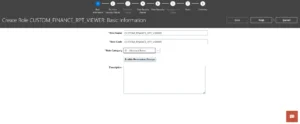
- Step 1 Create a Custom Role. In BIP Administration, navigate to Security Center → Roles and Permissions and create a new role with a meaningful name, for example CUSTOM_FINANCE_RPT_VIEWER. This role has no inherent BIP functional privileges of its own, it is a pure organizational container. Ensure you select “BI – Abstract Roles” as the Role Category; otherwise, you won’t be able to add it as an Application Role in the Permissions tab of the object (DM, Report, or Folder).
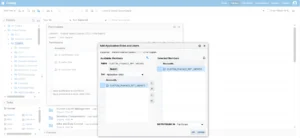
- Step 2 Assign the Role to the Catalog Object. Go to the folder or report in the catalog, open its Permissions, and add this custom role with the appropriate permission level (typically Read for report consumers, Read/Write for developers).
- Step 3 Assign the Role to Users. Back in Security Center, assign CUSTOM_FINANCE_RPT_VIEWER to every user who should have access to those objects. When a user is later removed, simply remove the role from their profile; no catalog permissions need to change.
This pattern aligns directly with Oracle’s own best practice guide.
The advantage over direct user assignments is significant. When 50 users need access to a Finance reports folder, you add one role to the folder’s permissions and assign that role to 50 users, rather than manually adding 50 individual entries to the folder’s permission list. When an employee leaves, removing the role from their user profile is sufficient.
How it connects to Oracle Fusion Job Roles: In Oracle Fusion Cloud (SaaS), BIP catalog permissions can reference both BIP-native custom roles and Oracle Fusion Duty Roles. Duty Roles are stored in the Fusion Policy Store and carry reporting privileges in the BI repository and catalog. This means a user who already has, say, the Financial Analyst Job Role in Fusion will inherit its associated Duty Roles like “Run Receivables to General Ledger Reconciliation Report”, “Run Payables to General Ledger Reconciliation Report” etc., which already include read access to certain catalog folders without any BIP-specific configuration needed. Understanding this inheritance chain is critical to avoiding accidental over-exposure.
Closing Thoughts
Security in BIP reports shouldn’t be the last checkbox before go-live. When you try to bolt it on after the fact, you end up rewriting SQL, reworking data models, and cleaning up permissions that were handed out without a plan. That rework is always more painful and more expensive than getting it right from the start, especially when the reports touch payroll, financials, or employee PII.
The approach worth following is straightforward: lock down the data layer using secured views, and control catalog access using the Abstract or Dummy Role pattern. This two-level model isn’t just a recommendation floating around in consulting circles. It’s how Oracle actually designed Fusion security to work. When you build your reports this way, you stay aligned with the platform architecture, audits become simpler, and scaling your reporting environment down the road doesn’t turn into a security firefight.
If there’s one thing I’d want any implementation team to take away, it’s this: treat BIP security as part of your build, not as a problem for later. The effort upfront is minimal. The cost of getting it wrong is not.

Raj is a skilled professional with 3 years of experience in Oracle HCM, specializing in BIP, OTBI, HDL, and HCM Extracts. Beyond his technical expertise, he enjoys playing cricket and has a passion for watching movies.
Stay Ahead with ERP & AI Insights
Actionable insights on ERP, AI and business solutions, straight to your inbox each month.
Subscribe for InsightsFollow Orbrick on Google
Pick Orbrick as a preferred source and Google is more likely to show you our insights in Top Stories and AI Mode.
Recent Posts





Categories
Latest News

Website Launch And 3 Lessons From Chandrayan-3
January 16, 2024


Real Time Visibility In Supply Chain
January 16, 2024