A supplier agrees to 2/10 net 60. In simple terms, you get a 2% discount if you pay within 10 days. If you don’t, you pay the full amount within 60 days.
Now imagine the invoice comes into AP, but the payment terms are captured as Net 30. Maybe the invoice was read incorrectly. Maybe an old default was picked up. Maybe someone entered the terms manually. Nothing looks obviously wrong. The invoice gets approved, goes into the next payment run, and the company pays on day 30.
The invoice was paid. The accounting is correct. No error message appeared. But the company still lost the 2% discount, and it paid 30 days before it had to.
That’s the part of AP automation that often gets missed: a mistake at the beginning of the process can affect a decision much later. That is why I think Oracle’s Payables Agent and Payments Agent are worth looking at together. Most conversations about AP automation start and end with invoice capture, but what happens to that information afterwards matters just as much.
Before the agents: How AP usually worked
On many Fusion projects, AP has looked similar. Invoices arrive in a shared mailbox, some suppliers use the supplier portal, and others send scanned copies through different departments. Then someone has to open each invoice, enter the details, find the PO, check the supplier, fix missing information and deal with exceptions. Meanwhile, payment runs happen on a fixed schedule, often because that is how the process has always been run.
It’s not a user problem. There are simply too many small manual steps, and that is where the new agents start to change things.
Starting at the inbox
The Payables Agent starts with invoice intake. Oracle’s Capture setup lets you define where invoices come from and how they’re grouped into streams. A stream is a flow of documents with something in common, such as the sender, file type or channel. If you run multiple business units, you can also map an email alias to a business unit so invoices that don’t match anything else still land in the right place. From there, Document IO reads each document and maps it into invoice fields, across file types, page counts and languages.
Training has also changed a lot since 26B, when Document IO replaced the older Intelligent Document Recognition. Because it uses large language models, most invoice attributes are picked up automatically, and you only train the few fields it misses. That is usually a one-time job per invoice layout, so start with high-volume suppliers and the ones with messy layouts. For example, complex invoices from suppliers such as Amazon may need additional training when certain fields aren’t being captured correctly. Their layouts didn’t follow a standard format, and some fields weren’t being picked up correctly. Once the training was saved, the agent recognized those fields on every new invoice from the same suppliers, so nobody had to correct them again.
26C went further and added training for descriptive and global descriptive flexfields on PDF and image invoices. That is useful if your company tracks its own invoice attributes or has country-specific fields to capture.
Most teams train in a test environment first, so moving that learning to production is always a question. In 26D you can export and import fingerprint-based training yourself. The import checks the file and warns you before it overwrites existing learning. Read those warnings properly, especially if production already has newer training than test, or you could replace good learning with old test data.
From setup screens to business policies
Instead of building every rule manually through setup screens, Compliance and Control lets you upload business policy documents, and the agent reads them and turns them into rules. Completion policies fill in what’s missing from the invoice, like account combinations, tax determinants and project information. Control policies check invoices against your criteria and against related POs or receipts and flag anything that doesn’t fit for review.
This needs a bit more care than it looks. Some fields can only be filled in when specific criteria are present. A rule that fills in the distribution account, for example, needs Ledger as one of its criteria fields. Leave it out and the rule never matches, so invoices keep coming through with the account blank. It’s an easy one to miss, and it comes up often in real implementations and in community discussions.
26D also moves invoice matching controls into Compliance and Control. Until now, one tolerance at the supplier site or business unit had to cover everything. Say that tolerance is 2%, but medical consumable prices regularly move up to 5%. Every one of those invoices goes on a price hold, and someone releases it without changing anything. With matching controls, you can add a rule for that business unit and purchasing category with a 5% tolerance. An invoice 4% over the PO price gets its hold released automatically. One that is 7% over still waits for review. Your existing tolerances stay in place as the baseline.
What happens when an invoice needs attention
Not every invoice goes straight through, and that is fine. The Streams page tells you quickly whether the problem is with the whole file or just one invoice buried inside it, which matters more than it sounds. I’ve seen teams waste time investigating a “failed” file when only one line item out of twenty had an issue.
The Payables home page helps here too. Instead of opening five screens and filtering each one, you get a prioritized list to start from. And when a document pauses for review, that is not a failure. It’s a control point doing its job, so there’s no need to panic when you see one.
The Invoice List feels more like a conversation than a search form. You ask for what you need in plain language, then act on it directly, whether that is releasing an exception, correcting a value or overriding an anomaly. If an import gets rejected, the correction spreadsheet is still there as a fallback, which is reassuring if you’re used to the old way of working.
The supplier master still matters
AI can read an invoice, but it can only match what your supplier master tells it. The invoice says ABC Trading Ltd, the supplier master says ABC Trading Limited. Or the invoice comes from a different legal entity or email address. Each small difference can create an exception someone has to investigate, and across thousands of invoices that becomes a real workload.
The bigger risk is a wrong match with no exception at all. Payables Agent identifies suppliers using details like name, address and tax registration number. If two suppliers share the same address, an invoice from one could be matched to the other. If no one catches it during review, the payment goes to the wrong supplier’s bank account. Caught before payment, it’s a quick fix. Caught after, someone must chase a refund from the other supplier, reverse the payment and pay the right one again.
Finding the right suppliers for discounts
The Payments Agent also helps you figure out which suppliers are worth approaching for early payment discounts, rather than guessing. You can sort suppliers by how much you spend with them, then narrow that list by things like their payment terms, how often they’ve taken a discount before, how often they’ve missed one, and whether they’ve said yes to an early-payment offer in the past. Once you’ve picked a supplier, the Supplier Offers Assistant drafts the offer, sends it, and keeps track of whether they accept.
On the payment execution side, you can just ask in plain language how a payment file is doing, or why something got rejected. It also flags things worth checking on its own, like a payment that hasn’t reconciled, a card payment that keeps failing, an offer that’s about to expire, or a supplier whose offer email is missing so the offer can’t even go out.
One invoice, end to end
Put together, the two agents make more sense as one AP story.
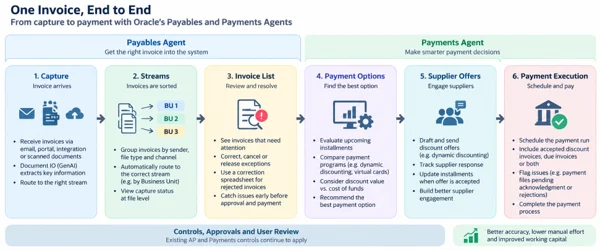
Controls, approvals and user review stay important across the whole process. People remain in the flow. The system just does more of the routine work before they need to step in.
What needs to be ready before you start
The agents get most of the attention, but the setup underneath them decides how well they work.
- Supplier and PO data. Names, addresses and PO information should match what appears on invoices. The supplier profile matters on the payment side too: if the offer email address is missing, the system can’t send the offer.
- Clear business policies. The agent builds rules from your policies, so a vague or conflicting policy produces rules that need more review. Treat generated policies as something to validate, not switch on blindly.
- Business unit access. A user may reach the Streams page but still be unable to see invoice details if the BU data security isn’t in place. After granting BU access to the custom job role, run Process Permission Group Policies.
- The Payables Agent has its own duties for document processing, capture, policy configuration, invoice processing and insights. For the Payments Agent, Oracle’s documented setup uses a custom role based on Payment Specialist, with the required permission groups and the AI agent runtime duty.
- Your actual payment program terms. If you’ve negotiated specific dynamic discounting or virtual card terms, those documents need to be given to the agent. In AI Agent Studio, upload the financing program documents through the Financing Programs tool, then run Process Agent Documents. Otherwise, the assistant may use system defaults, and the benefit calculations won’t reflect your negotiated terms.
One thing I’ve learned from Fusion projects is that the problem isn’t always where you expect it. A user logs in, the menu is there, the page opens, but there’s no data. It looks like a functional defect. Very often it’s a role or data-access issue. I’ve lost more testing time to these than to some genuine functional defects, so I check roles and data access early, before the testing team reports that something is missing.
The agents don’t replace your controls
None of this replaces your existing controls, and that’s by design. Every recommendation and draft still needs a human to review it, and your approvals, segregation of duties and validations keep working exactly as before. Payment scheduling still uses your existing Payment process request templates and still needs someone to confirm it before it goes out, which matters a lot since real money is moving. The same caution applies to supplier offers. A supplier can qualify for a discounting program on paper and still say no. And since the traditional Fusion pages stay available right alongside the agents, a controlled rollout with a small group of high-volume suppliers makes far more sense than switching everything on at once.
Closing the loop at month end
In 26D, Oracle introduced the Payables Period Close Workspace, an agentic application for the usual month-end hunt across five different screens. For the selected ledger and period, it pulls invoices, payments and period status into one place, ranks priority actions by urgency and monetary impact, and lets you use Ask Oracle to see what each issue is holding up. It also follows your own SOP. Your milestones, thresholds, owners and signoffs decide what counts as done, what needs confirmation and what gets escalated.
Fusion Claw, recently announced by Oracle, pushes this further. It’s a runtime that lets Fusion agentic applications actually carry out work, within your SOPs, policies and approval limits, at whatever level of autonomy you choose. Every action leaves an Outcome Receipt showing the authority used, the evidence and the result.
Which brings me back to that Net 30 invoice. It doesn’t go away once it’s paid. If nobody catches it, it turns up again at month end as something blocking the close. As these applications get more autonomy, that matters even more, because an agent is only as reliable as the data it acts on.
Where I would start
If I were starting an implementation today, I wouldn’t start with the most impressive AI feature. I’d start with the basics: clean supplier data, sensible invoice streams, the right document formats and training, clear business policies, and correct roles and BU access. Once those are in place, I’d bring the Payments Agent in.
If the supplier, amount, payment terms or dates are wrong, automation at the payment end won’t fix it. It will just make the wrong decision faster. For me, that’s what matters most with these new AP agents: keeping the information reliable all the way from capture to payment.